Stop Hand-Writing and Brute-Forcing Prompts: Use DSPy Instead
DSPy is a Python framework that writes the prompt for you. You declare what an LLM call takes and returns, define a metric, and an optimizer tunes the wording.
Most production LLM calls come with the same overhead: a prompt template with formatting rules, a JSON parser with retry logic, a reasoning pattern built from scratch, and quality checks that amount to reading outputs and hoping they look right. Switch models and every prompt needs manual re-tuning. Collect better eval data and there is no systematic way to use it.
DSPy is a Python framework that removes that overhead. You declare what an LLM call takes and what it returns, and DSPy writes the prompt, parses the reply, and tunes the wording against data you supply. The prompt stops being a file you maintain and becomes an output of your system.
It works in three steps. Declare the task by its inputs and outputs and DSPy builds the prompt, calls the model, and hands back typed values. Reuse a proven prompting technique by picking the module that already implements it. Optimize against your own data, so a metric tunes the prompt instead of your taste. One example runs through all three: generating a professional email.
1. Declare the task, not the prompt
Say you need to write a professional email about a topic, in a given tone. Without DSPy:
def generate_email(topic: str, tone: str) -> dict:
    prompt = f"""Write a professional email.

Topic: {topic}
Tone: {tone}

Return your response as valid JSON with no markdown formatting:
{{ "subject": "...", "body": "..." }}

Do not include backticks. Do not add text before or after the JSON."""

    for attempt in range(3):
        response = client.chat.completions.create(
            model="gpt-5",
            messages=[{"role": "user", "content": prompt}],
        )
        text = response.choices[0].message.content.strip()
        if text.startswith("```"):
            text = text.split("\n", 1)[1].rsplit("```", 1)[0]
        try:
            result = json.loads(text)
            assert "subject" in result and "body" in result
            return result
        except (json.JSONDecodeError, AssertionError):
            if attempt == 2: raise
The intent is "generate an email," but most of the code is plumbing: formatting instructions, JSON escaping, a retry loop, markdown fence stripping, and manual validation. Remove any of those layers and the function breaks in production.
In DSPy you declare that intent instead of writing it out, and the declaration has a name: a Signature. You subclass dspy.Signature, put one sentence in the docstring saying what the task is, and list the fields. There is no prompt in it anywhere.
import dspy

class WriteEmail(dspy.Signature):
    """Write a professional email about the given topic, in the given tone."""

    topic: str = dspy.InputField(desc="what the email is about")
    tone: str = dspy.InputField(desc="e.g. formal, friendly, urgent")

    subject: str = dspy.OutputField(desc="Email subject line")
    body: str = dspy.OutputField(desc="Full email body")

email = dspy.Predict(WriteEmail)
result = email(topic="Following up on a job application", tone="formal")
# result.subject and result.body are typed strings
That is the whole contract: what goes in, what comes out, and what each field means. DSPy handles prompt construction, output parsing, type coercion, and retries. The docstring is not just a comment: DSPy uses it as the core instruction when building the prompt.
2. Reuse a proven prompting technique instead of rebuilding it
A Signature names the fields: topic and tone going in, subject and body coming back. It says nothing about how the model should think on the way. That part is a Module: you hand it a Signature and it decides what reasoning happens between the input fields and the output fields. The prompting techniques that papers and blog posts describe are already implemented as modules, each a one-line call that takes any Signature:
# Direct call, no reasoning
email = dspy.Predict(WriteEmail)

# Think step-by-step before writing
email = dspy.ChainOfThought(WriteEmail)

# Reason, use tools (e.g. look up the policy it should cite), then write
email = dspy.ReAct(WriteEmail, tools=[search_handbook])
Swapping dspy.Predict for dspy.ChainOfThought is a one-word change: no prompt rewrite, no new parsing logic, and the Signature and calling code stay the same.
The practical effect is fast prototyping. You start with dspy.Predict to get the pipeline working, then upgrade selectively: the email writer might get ChainOfThought because its outputs are too generic, a review step Refine, which runs the module several times against a reward function and keeps the best attempt.
When your task matches none of them, you write your own: a class with a forward() method that calls other modules. That composition is itself a module, so an optimizer tunes every step as one program.
You could stop reading here and still come out ahead. Two steps in, structured data comes back from a model as typed Python, and the JSON wrangling, the retry loop, and the hand-rolled reasoning pattern are gone. The third step is what turns a tidier way to call a model into something you can improve on purpose.
3. Optimize against your own data
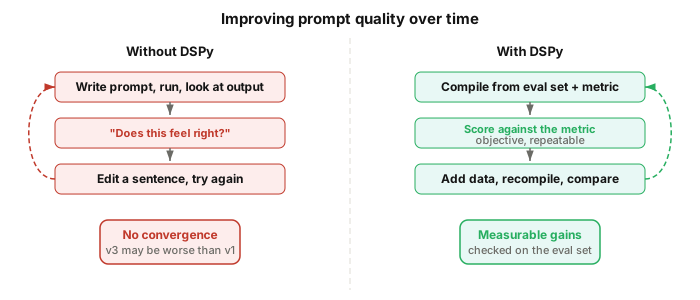
The standard prompt engineering workflow: write a prompt, run it, look at the outputs, edit a sentence, run it again, check if it looks better. There is no metric. The feedback loop is "does this feel right?" That is craft, not engineering.
DSPy adds a compilation step. You define a metric, build an eval set, and hand both to an optimizer. They differ in what they search over: BootstrapFewShot hunts for worked examples to put in the prompt, GEPA rewrites the instruction itself, and MIPROv2 searches both at once. The one below is GEPA. The eval set can be a CSV:
import csv
import re

# "[Your Name]", "[Company]" — the gap a model leaves when it does not
# know something and will not say so.
PLACEHOLDER = re.compile(r"\[[^\]\n]{2,40}\]")
CHECKS = 4

# Define what "good" means, and say why when it is not
def email_quality(example, prediction, trace=None, pred_name=None, pred_trace=None):
    problems = []
    if len(prediction.subject) > 60:
        problems.append(f"Subject is {len(prediction.subject)} characters. Keep it under 60.")
    if example.tone.lower() in prediction.body.lower():
        problems.append(f"The body names the tone ('{example.tone}') instead of reading that way.")
    if len(prediction.body) < 40:
        problems.append("The body is too short to be a real email.")
    if holes := PLACEHOLDER.findall(prediction.body):
        problems.append(
            f"The body leaves blanks for someone to fill in ({', '.join(holes[:3])}). "
            "Write around anything you were not given instead of inventing a slot for it."
        )

    return dspy.Prediction(
        score=1.0 - len(problems) / CHECKS,
        feedback=" ".join(problems) or None,
    )

# Load eval set from a spreadsheet
with open("email_examples.csv", newline="") as f:
    eval_set = [
        dspy.Example(**row).with_inputs("topic", "tone")
        for row in csv.DictReader(f)
    ]

# Score the baseline before tuning anything
email = dspy.ChainOfThought(WriteEmail)
baseline = dspy.Evaluate(devset=eval_set, metric=email_quality, num_threads=4)(email)

# Then compile
optimizer = dspy.GEPA(
    metric=email_quality,
    auto="light",  # search budget: light, medium, or heavy
    reflection_lm=dspy.LM("openai/gpt-5", temperature=1.0, max_tokens=32000),
    num_threads=4,
)
compiled_email = optimizer.compile(email, trainset=eval_set)
compiled_email.save("optimized_email_writer.json")
Run the baseline first. Without a number from before the optimizer touched anything, a compiled program is just a different prompt, not a better one. The same metric does both jobs: dspy.Evaluate reads the score, GEPA reads the score and the feedback.
GEPA runs your program over the eval set, reads what the metric said about each failure, and has a second model, the reflection_lm above, rewrite the instruction. The auto setting bounds what that search spends: light, medium, and heavy are budgets, not quality tiers. The metric returns a score and a sentence explaining it, because that sentence is what the second model reads: a bare number says something is wrong, the sentence says what to change. That reflection model should be strong even when the task runs on something cheaper, since it is called once per proposal, not once per example.
The placeholder check exists because of what weaker models do: run this against a small local model and the emails come back full of [Company Name] and [Your Phone Number]. Rather than write around a detail it was never given, the model leaves a slot for a human to fill: a competent-looking draft that is useless as an email. So write down the specific way your outputs go wrong, not the way quality sounds in the abstract.
In production you load the compiled program and call that, not the module you started with, which has none of the tuning in it:
email = dspy.ChainOfThought(WriteEmail)
email.load("optimized_email_writer.json")

result = email(topic="Following up on a job application", tone="formal")
Save it as JSON and the rewritten instruction is plain text, so it diffs in a pull request and versions alongside your code. When a new edge case surfaces, you add a row to the spreadsheet and recompile: the Signature and Module stay the same, and only the compiled prompt changes. You can write good prompts by hand. What you cannot do is improve them systematically as the data grows.
What DSPy buys you when a new model ships
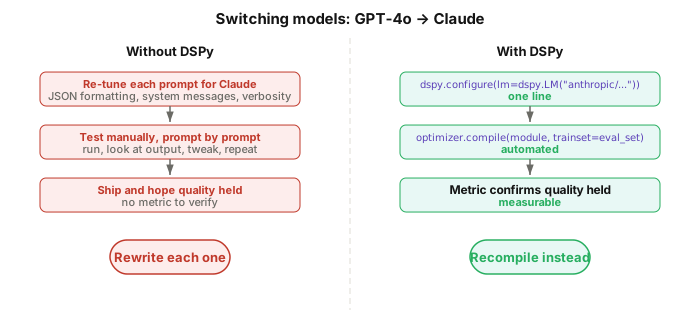
Without DSPy, every prompt is written against one model's tendencies. Models differ in how they handle formatting, system messages, and reasoning, so "try the model that shipped last week" becomes "re-tune every prompt for it." With ten LLM calls, that is ten prompts to rewrite and ten sets of outputs to re-check by eye.
With DSPy, the model is a configuration parameter, and the question of whether to switch is answered by the eval set you already have:
# A new model ships. Point the config at it.
dspy.configure(lm=dspy.LM("anthropic/claude-sonnet-5"))

# Re-run the eval you already wrote.
score = dspy.Evaluate(devset=eval_set, metric=email_quality, num_threads=4)(email)

# Only if it moved: recompile for the new model.
compiled_email = optimizer.compile(email, trainset=eval_set)
compiled_email.save("optimized_email_writer.json")
Notice what never happens in that sequence: nobody opens a prompt. The Signature holds your intent; the compiled prompt holds whatever it takes to get one model to act on it, so a new model means regenerating it rather than editing it.
Where to start
Declare, reuse, and optimize are three ideas. Running them is five concrete moves, in order:
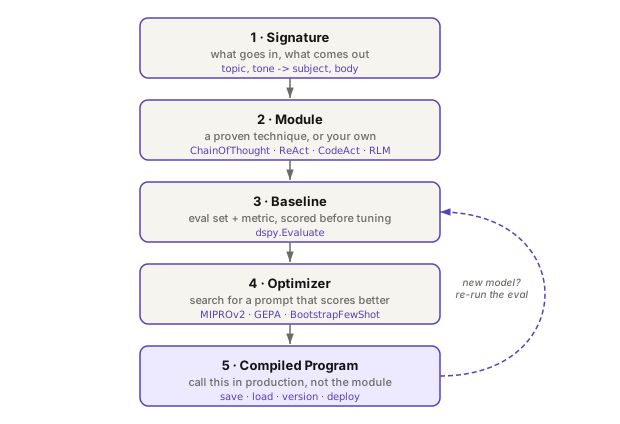
Install DSPy with pip install dspy, then pick one LLM call in an existing project, ideally the one that breaks most often. Rewrite it as a Signature, hand it to dspy.ChainOfThought, and run it. It is a single call site, so you can put it back if you do not like it.
If the result is promising, put together a spreadsheet of a dozen or so inputs, varied along whatever actually changes the answer, and run an optimizer. A dozen is enough to watch a score move, which is all you need to know whether this is worth more of your time. DSPy's own guidance is 30 to 300 rows for real optimization, and you get there by adding one each time something breaks, not by writing them all up front. That is where the payoff compounds: improving the system turns into a data job instead of a prompt job.
The full code is in the companion repo: both versions of the email writer side by side, a sample eval spreadsheet, and the optimization script. It also carries a Claude agent skill, prompt-to-dspy: point it at a codebase and it finds the f-string prompts, scores the code as it stands (inventing eval inputs if you have none), proposes a Signature and a module for each call, and scores the result against the number it started with.
- DSPy documentationdspy.ai
- Separating Task from ModelCompound AI
- dspy-email-writerGitHub
comments